Taming Digital Distractions: How UK Students Can Beat Exam Anxiety in the Digital Age


You face exam anxiety in the digital age. A survey found a staggering 85% of UK students experience this stress. Pervasive Digital Distractions often fuel these worries. Smartphones and computers disrupt your learning, both at home and in the classroom. Many 15-year-olds, for example, report digital device distractions during lessons. Understanding this connection helps you manage your digital environment and study habits effectively.
Key Takeaways
Digital distractions, like social media and constant notifications, increase exam anxiety and make studying harder for UK students.
Set clear digital boundaries by using 'do not disturb' modes, setting screen time limits, and creating 'digital-free' study times.
Create a calm study space by tidying your area and digitally decluttering your devices to improve focus.
Use technology wisely for studying with productivity apps and for calm with mindfulness apps to help manage stress.
Build healthy digital habits by taking regular screen breaks and creating tech-free zones to support your academic success and well-being.
Understanding Digital Distractions: How Screens Fuel Anxiety
FOMO and Notification Overload
Social media platforms constantly show you what your friends are doing. This creates a feeling called FOMO, or 'Fear of Missing Out'. You feel a pervasive worry that others might have rewarding experiences without you. This desire to stay connected drives you to check your phone often. This constant exposure to friends having fun can cause anxiety, loneliness, and feelings of inadequacy. You feel compelled to stay online to avoid feeling left out. Studies show a strong link between heavy social media use, FOMO, and increased anxiety.
Social media can also become addictive. About 5% of young people experience this. The constant notifications and instant gratification give you a "dopamine hit." When you do not get this instant reward, you might keep refreshing your feed. If you do not get enough 'likes', you might feel unpopular, which increases anxiety and loneliness. An OECD study found that heavy social media users generally report lower life satisfaction.
Your phone constantly buzzes with alerts. The average teenager receives 237 smartphone notifications every day. These constant pings interrupt your focus and break up your study time. Online platforms also create unreasonable expectations. Photo-sharing apps often show manipulated images. This creates an 'idealised body image' that negatively affects your self-esteem. Nine out of ten young females are unhappy with their appearance, according to a Royal Society of Public Health finding. Social media also encourages you to spend money because of FOMO. Many young people admit to debt because they feel they need to buy certain things to keep up. Influencers often promote products, making you feel you need them to have a similar lifestyle.
Information Overload and Mental Well-being
The internet offers endless content, from news to entertainment. This constant stream of information can lead to cognitive overload. You might find yourself 'doomscrolling', which means you keep looking at negative news. This diverts your attention from studies and makes your exam anxiety worse. A UK survey of 2157 young people found that 68% of those aged 16-21 have seen harmful or disturbing online content. More than a third (35%) have seen content about suicide or self-harm. Over a quarter (28%) have been exposed to pro-eating disorder content. Other harmful content includes racism (42%), bullying (40%), and misogyny (32%).
“The scale of harm being caused to young people by negative online communities is one of the biggest looming threats to young people’s mental health. Too many young people are being harmed or disturbed by what they see online, which threatens to have a serious impact on them. In particular, the exposure to suicide, self-harm, and eating disorder encouragement is a grave reflection of the danger harmful online communities pose. We also know from long-established research that experiencing bullying and racism – the most common forms of online harm reported in our polling – are directly linked with worse mental health, and are compounded by experiences of growing inequality and financial pressures that disproportionally affect young people.”
While social media can offer support and connection, it also presents risks. You might experience disrupted sleep if you use social media at night. This affects your learning and increases your risk of depression and anxiety. You might also stumble upon violent, racist, or pornographic material, which can be shocking. There is also a risk of cyberbullying, which doubles the likelihood of self-harm among young people. Many young people worry about their body image due to social media.
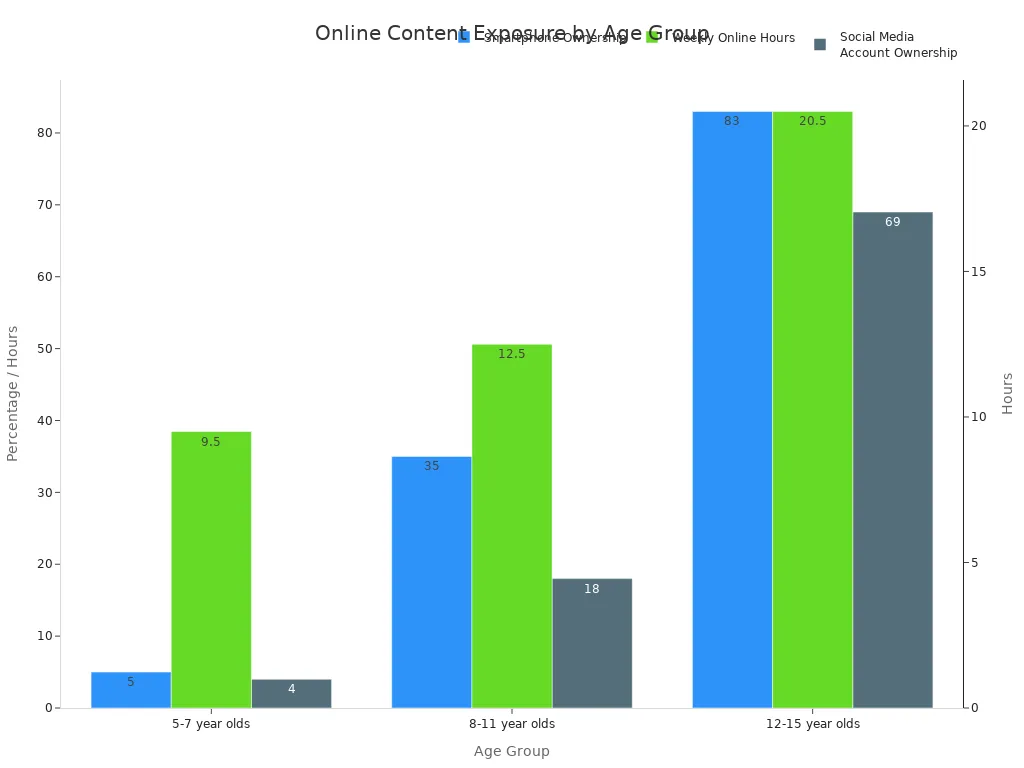
This chart shows how much time young people spend online. For example, 12-15 year olds spend over 20 hours online each week. A study by UCL researchers found that if you have poorer mental health, you are more likely to browse negative content online. This then makes your symptoms worse. This creates a cycle where your mental health and online browsing negatively affect each other. These Digital Distractions contribute significantly to your overall stress.
Multitasking's Hidden Costs
You might think you can study and check your phone at the same time. However, attempting to multitask with digital devices often reduces your actual productivity. It increases your perceived pressure, making exam anxiety worse instead of better. Off-task multitasking by students negatively affects the learning of those around them, much like second-hand smoke. You tend to overestimate your ability to switch tasks. You also underestimate the negative impact on your studies.
Digital distractions interfere with the accuracy and completeness of information in your working memory. Switching between tasks impedes your learning and academic achievement. This happens regardless of your interest in the class, your motivation, or your intelligence. Research shows a negative link between multitasking and your ability to control your thoughts. You often overestimate your multitasking skills. Some lab tests even show that those who think they are good at it actually perform worse.
Multitasking makes you less productive than if you focused on one task. It strains your prefrontal cortex, which is the brain's command centre for executive function. Neuroimaging shows that multitasking creates bottlenecks, disrupting communication between different parts of your brain. A 2009 study by Clifford Nass and colleagues found that high multitaskers were not more successful. This indicates that multitasking does not lead to increased productivity. These Digital Distractions fragment your attention and make effective study much harder.
Strategies for Digital Well-being and Focus

You can take control of your digital life. This helps you improve your focus and reduce exam anxiety. You need to manage how you use digital tools. You also need to create a better study space.
Setting Digital Boundaries
You must set clear rules for your digital devices. This helps you regain focus. Start by using your phone's built-in features. Turn on 'do not disturb' mode during study times. This stops notifications from interrupting you. You can also set screen time limits for apps like social media. This helps you avoid endless scrolling.
You should also schedule 'digital-free' study blocks. This means you put your phone away completely. You can use methods like the Pomodoro Technique. This involves working in short, focused bursts, usually 25 minutes, followed by a short break. Apps like Forest can help you stay focused. It grows a virtual tree when you avoid your phone. If you pick up your phone, the tree dies. Other apps like StayFocusd limit your time on distracting websites. You can customise these limits.
To truly focus, physically remove your phone from your study area. Use app or site blockers to prevent digital distractions. Set a timer for focused study periods, perhaps 25-60 minutes. Keep a 'later list' for any stray thoughts. This stops you from interrupting your flow.
Stricter mobile phone policies in schools have shown positive effects on exam results. This proves that reducing phone use helps you concentrate better.
Conducive Study Environment
Your study environment plays a big part in your focus. Even a well-designed study area can suffer from distractions. Mobile phones and social media are major disruptors. You need to create a space that supports your learning.
First, optimise your physical study space. Make sure it is quiet and tidy. Keep your phone on silent. You can use apps that block social media and other distractions during study periods. Designate specific times for checking emails and messages. This stops constant notification interruptions. You might even use a dedicated browser or user profile just for academic tasks.
Next, digitally declutter your devices. This reduces cognitive overload.
Conduct a Digital Audit and Tidy Your Desktop: Organise your computer desktop or phone home screen. Create simple folder structures. Remove unnecessary shortcuts. This reduces visual clutter.
Conquer Your Email Inbox and Subscriptions: Unsubscribe from unwanted newsletters. Archive old emails. Delete unnecessary ones. Consolidate emails to one main account. This simplifies communication.
Streamline Your Cloud and Photo Storage: Delete duplicate or blurry photos. Organise the rest into labelled albums. Create logical filing systems for documents. This frees up space and makes things easy to find.
Review Your Social Media and Online Accounts: Unfollow accounts that no longer provide value. Adjust your privacy settings. Delete old, unused accounts. This manages your digital footprint.
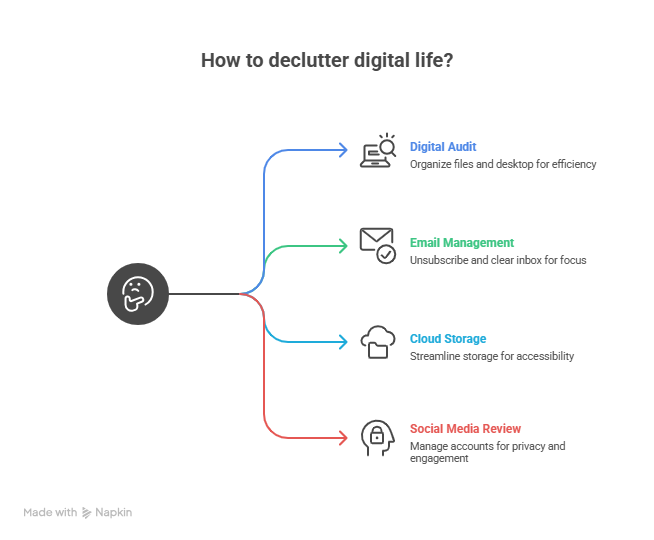
You should also unsubscribe from unnecessary emails. Unfollow accounts that do not add value. Delete unused apps. Keep only vital apps on your home screen. Schedule tech-free breaks. Try the 20-20-20 rule: look 20 feet away for 20 seconds every 20 minutes. Schedule one-hour tech-free periods daily. Plan a screen-free day weekly. This helps reset your brain.
Mindful Technology Use
You should use technology as a tool, not a constant companion. Be intentional about your digital interactions. Recognise when you need to step away. Technology can support your learning in many ways.
For daily review, tools like a Comprehension Questions Generator can help. A Misconception Solver can also strengthen your memory. When you learn new material, a Story Book Creator can break down complex topics. A Creative Writing Visualiser can help with writing skills. These tools make learning more engaging.
AI Chat can generate curriculum-specific questions. A Comprehension Questions Generator can target different reading skills. This helps you ask better questions. A Maths Stem Sentence Generator encourages structured responses. It boosts your independence in multi-step tasks. For weekly and monthly review, a Misconception Solver identifies knowledge gaps. This helps teachers create targeted review questions.
Technology can also personalise your learning. You can create your own learning paths. This balances your freedom and responsibility with teacher support. It fosters self-regulated learning. The key is to use technology as a support. It helps with continuous student assistance. It also helps with information exchange between teachers. Human interaction remains central.
Some schools use Lockabl phone pouches. These pouches help students focus on lessons. They minimise Digital Distractions from notifications, social media, and games. This leads to better academic performance. These pouches also promote healthier social interactions. They encourage students to be present. This fosters stronger friendships. It also improves communication skills. Limiting device access during lessons helps minimise cyberbullying and cheating. This creates a safer environment. Disconnecting from Digital Distractions can reduce stress and anxiety. This improves your mental well-being.
Leveraging Tech for Study and Calm
You can turn technology into a powerful ally. It helps you manage your studies and reduce stress. You just need to choose the right tools.
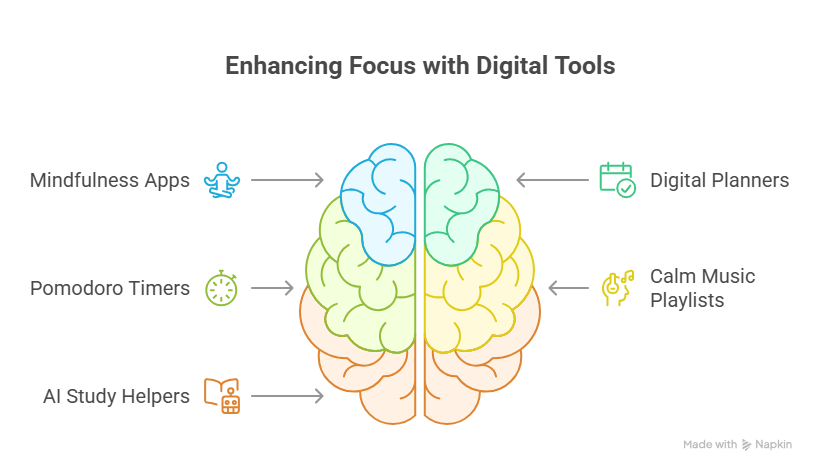
Productivity Tools for Focus
Many apps help you stay focused. The Pomodoro Technique uses short, focused study bursts. Apps like Forest gamify this process. You plant a virtual tree. It grows only if you avoid your phone. If you pick up your phone, the tree dies. This helps you maintain focus. The University of York recommends website blockers like Stayfocusd for Chrome and Edge. Leechblock also blocks distracting sites. Imperial College London suggests Freedom to block apps across devices. You can also use Todoist to organise tasks. My Study Life helps you track assignments and exams. These tools help you manage your study time effectively.
Mindfulness Apps for Calm
Technology isn’t just for studying — it’s also one of the best tools to help you manage exam stress. Several mindfulness and wellbeing apps are especially popular among UK students:
Headspace – Offers quick, guided meditations for exam stress, sleep, focus, and anxiety. Many UK schools and universities recommend it because of its simple structure and proven benefits.
Calm – Well-known for its soothing sleep stories, breathing exercises, and short meditation sessions that help reduce tension during revision periods.
Mindfulness Coach – A highly rated app offering structured mindfulness exercises, grounding techniques, and stress-relief practices suitable for students.
Aura – Popular in the UK for personalised meditation and relaxation tracks, especially useful during overwhelming revision schedules.
Smiling Mind – A free, psychologist-developed mindfulness app widely used by young learners to handle stress, stay focused, and build emotional resilience.
Balance – Offers customised meditation plans and short sessions perfect for revising students who need quick stress resets.
Online Resources for Support
You can find many online resources for academic help. BBC Bitesize offers lessons and quizzes for all key stages. Seneca Learning uses AI for GCSE and A-Level revision. Quizlet provides digital flashcards and study games. For mental health support, Student Space offers advice and tools. Togetherall provides 24/7 digital mental health support. You can share thoughts and join groups anonymously. The 'Sorted: Mental Health' app offers a guided audio program. It helps you switch to a beneficial state of mind.
Building Healthy Digital Habits for Long-Term Success
You can develop sustainable digital habits. This supports your academic success and mental well-being. Start by setting clear boundaries. Designate specific times for emails or social media. Take regular screen breaks. Apps can remind you to do this. Cultivate mindful focus. Use apps like Insight Timer for daily meditation. This helps you resist constant phone checking. You can use screen time trackers to monitor your digital consumption. Create tech-free zones, like your bedroom. This improves sleep quality. Set realistic goals for your digital habits. Educate yourself on technology's effects. This helps you make gradual changes. You can also use a digital detox. This means taking breaks from screens. These steps help you manage Digital Distractions and achieve long-term success.
You now have the tools to manage digital distractions effectively. You can set clear boundaries, use 'Do Not Disturb' mode, and create a calm study space. Remember, a balanced approach to technology is crucial for your academic success and overall well-being. You can use technology purposefully for learning, but also take breaks away from devices. This helps you reduce exam anxiety. Start implementing these changes today. Managing exam pressure involves achievable steps and consistency.
See Also
Helping Children Manage Academic Pressure: Effective Stress-Busting Techniques
Grammar School Exam Success: Three Essential Steps for UK Students
University Preparation: Staying Ahead Through the UCAS Application Process
Overcoming Study Hurdles: A Comprehensive Guide for Students, Parents, Tutors
Navigating Online Learning: Strategies to Conquer Common Educational Obstacles